Shopify MCP Installation Guide (Step-by-Step)
How to Install Shopify MCP: Complete Setup Guide for Ecommerce Brands
Artificial intelligence is rapidly changing how ecommerce businesses operate. Instead of relying on disconnected tools and manual workflows, Shopify merchants are increasingly deploying AI agents capable of analyzing store performance, answering customer questions, generating reports, managing products, and automating routine tasks.
The technology making this possible is MCP (Model Context Protocol).
This guide explains how to install Shopify MCP, connect your store data, and build a secure foundation for AI-powered ecommerce operations.
Whether you're implementing Claude, ChatGPT, custom AI agents, or an internal ecommerce assistant, this step-by-step guide will walk you through the process.
If you're new to Shopify MCP, start with our introductory guide: What Is Shopify MCP?
For a deeper look at MCP server architecture and how the protocol works, see our technical overview: Shopify MCP Server Explained: What It Is, How It Works, and Which Connectors You Need
What Is Shopify MCP?
Shopify MCP (Model Context Protocol) allows AI models to securely connect to your Shopify store and other business systems.
Without MCP, AI models can only respond using the information contained within a conversation.
With MCP, AI agents can:
- Access real-time inventory
- Review customer information
- Analyze store performance
- Create support tickets
- Generate reports
- Update product information
- Monitor operational workflows
| Scenario | AI Capability | Business Impact |
|---|---|---|
| Without MCP | Limited to conversation context only | Cannot access live business data |
| With MCP | Connects to Shopify, CRM, Analytics, Support | Real-time operations, automation, and intelligence |
Think of MCP as the bridge between your AI assistant and your business systems — which is why understanding which MCP connectors you need is essential before installation.
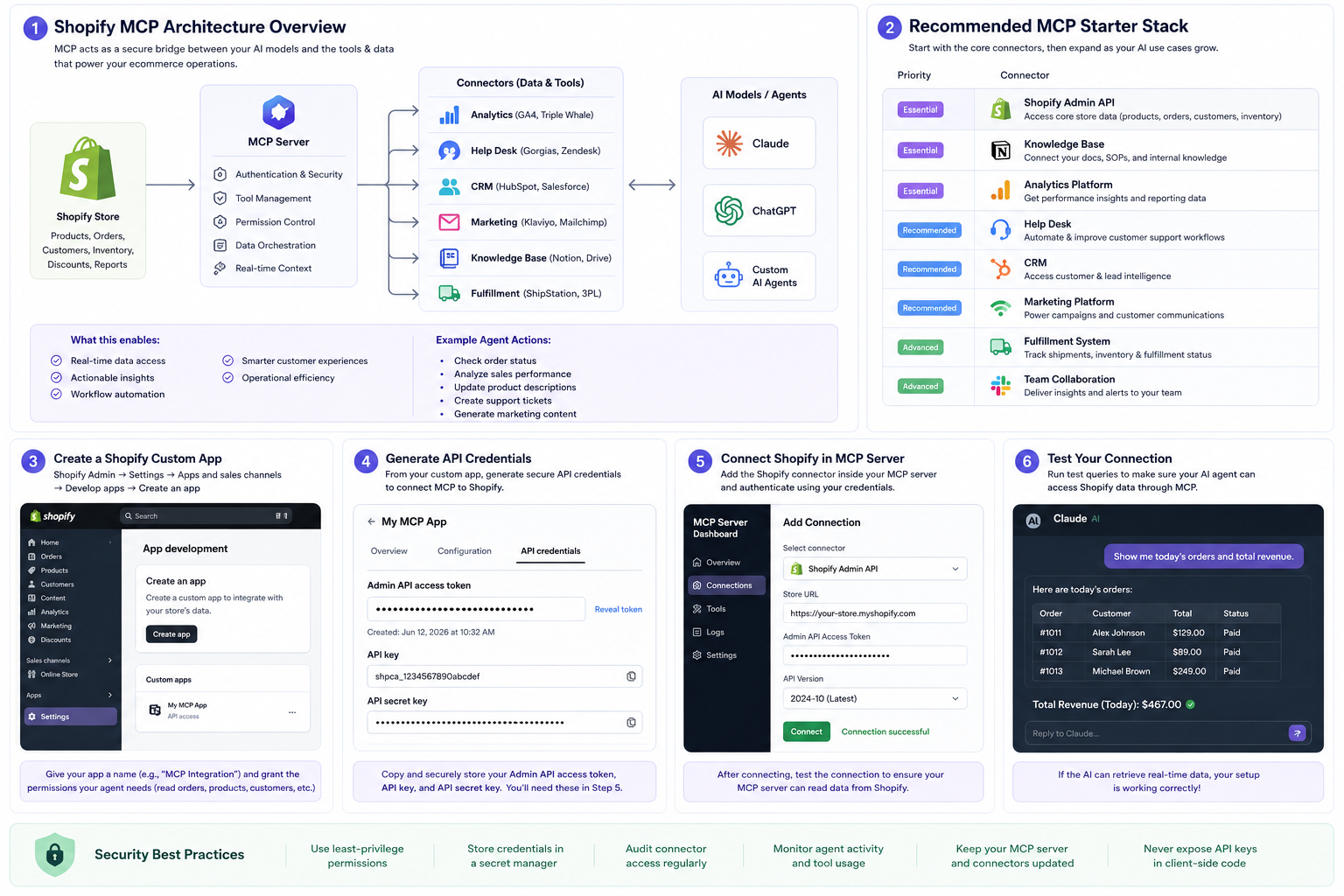
Before You Begin
Before installing Shopify MCP, make sure you have access to:
Required Accounts
| Account | Purpose | Priority |
|---|---|---|
| Shopify Admin | Store data access | Essential |
| AI Platform (Claude, ChatGPT, or custom agent) | AI model connection | Essential |
| MCP Server Environment | Hosting the protocol layer | Essential |
| API Credentials | Authentication | Essential |
Recommended Systems
| System | Purpose | Priority |
|---|---|---|
| Analytics Platform | Performance reporting | High |
| Help Desk Software | Customer support automation | High |
| CRM | Customer relationship management | Medium |
| Knowledge Base | Internal documentation access | High |
| Marketing Platform | Campaign optimization | Medium |
The more useful business systems you connect, the more capable your AI agent becomes. For a complete breakdown of connector priorities, see Shopify MCP Required Connectors Explained.
Step 1: Define Your AI Use Cases
Before installing anything, identify what you want your AI agent to accomplish.
Common use cases include:
Customer Support
| Use Case | AI Agent Action | Business Value |
|---|---|---|
| Order lookups | Query order status in real-time | Faster response times |
| Customer history reviews | Access purchase and interaction history | Personalized support |
| Support ticket management | Create, categorize, and route tickets | Reduced manual workload |
Operations
| Use Case | AI Agent Action | Business Value |
|---|---|---|
| Inventory monitoring | Track stock levels and forecast shortages | Prevent stockouts |
| Product management | Update descriptions, pricing, metadata | Operational efficiency |
| Fulfillment tracking | Monitor shipping and delivery status | Customer satisfaction |
Marketing
| Use Case | AI Agent Action | Business Value |
|---|---|---|
| Campaign reporting | Analyze performance metrics | Data-driven decisions |
| Customer segmentation | Identify high-value cohorts | Targeted messaging |
| Email content generation | Draft campaigns and flows | Faster content production |
Executive Reporting
| Use Case | AI Agent Action | Business Value |
|---|---|---|
| Revenue summaries | Aggregate sales data | Quick business overview |
| Sales trends | Identify patterns and anomalies | Strategic planning |
| Performance dashboards | Generate visual reports | Stakeholder communication |
The answers will determine which MCP connectors you need. This is one of the many ways AI agents save time and money for ecommerce businesses.
Step 2: Create a Shopify Custom App
To allow MCP to access Shopify data, you'll typically create a custom app within Shopify.
Navigate to:
Shopify Admin → Settings → Apps and Sales Channels → Develop Apps
Create a new custom app and assign appropriate permissions.
Common Permissions
| Permission Category | Access Level | Typical Use Cases |
|---|---|---|
| Products | Read/Write | Catalog management, content updates |
| Orders | Read | Order tracking, revenue reporting |
| Customers | Read | Purchase history, segmentation |
| Inventory | Read | Stock monitoring, forecasting |
| Analytics | Read | Performance data, reports |
Only grant permissions necessary for your intended workflows.
Following the principle of least privilege improves security and reduces risk.
Step 3: Generate Shopify API Credentials
Once the custom app is created, generate:
| Credential | Purpose | Security Level |
|---|---|---|
| Admin API Access Token | Authenticates API requests | Critical — never expose publicly |
| API Key | Identifies the application | High — store securely |
| API Secret | Validates application identity | Critical — encrypted storage only |
Store these credentials securely.
Never expose API keys publicly or embed them directly within client-side applications.
Most MCP installations use environment variables or secure secret managers.
Step 4: Deploy Your MCP Server
The MCP server acts as the connection layer between your AI model and your business systems.
Popular Deployment Options
| Deployment Method | Best For | Complexity |
|---|---|---|
| Cloud hosting platforms | Most businesses | Low-Medium |
| Docker containers | Technical teams | Medium |
| Private servers | Enterprise security requirements | High |
| Enterprise infrastructure | Large organizations | High |
What the MCP Server Manages
| Function | Description |
|---|---|
| Authentication | Verifies identity of connected systems |
| Permissions | Controls what AI can access and modify |
| Connector management | Routes requests to appropriate systems |
| Data requests | Handles queries from AI models |
| Tool execution | Performs actions on connected platforms |
Once deployed, verify that the MCP server is running and accessible.
For details on how MCP architecture works, see Shopify MCP Server Explained.
Step 5: Install the Shopify Connector
Next, connect Shopify to your MCP server.
You'll typically provide:
| Configuration | Example | Notes |
|---|---|---|
| Store URL | yourstore.myshopify.com | Your Shopify domain |
| API Token | shpat_xxxxx | Generated in Step 3 |
| API Version | 2026-01 | Use latest stable version |
| Authentication Settings | OAuth or Custom App | Depends on implementation |
Once connected, test access to:
| Data Type | Test Query | Expected Result |
|---|---|---|
| Products | List first 10 products | Product names and IDs returned |
| Orders | Get recent orders | Order details with status |
| Customers | Search by email | Customer profile returned |
| Inventory | Check stock levels | Quantity data returned |
Successful responses confirm the connector is working correctly.
Step 6: Connect Your Knowledge Base
This step is often overlooked but provides significant value.
Popular Knowledge Sources
| Platform | Best For | Integration Effort |
|---|---|---|
| Notion | Team wikis and SOPs | Low |
| Google Drive | File-based documentation | Low |
| Confluence | Enterprise documentation | Medium |
| Internal SOP Documents | Custom processes | Varies |
Connecting company knowledge allows AI agents to answer questions using your actual business processes instead of relying solely on general training data.
This dramatically improves response accuracy and is a key component of building effective conversational commerce experiences.
Step 7: Add Analytics Connectors
Analytics connectors help transform AI into a decision-making assistant.
Common Integrations
| Platform | Best For | Key Data |
|---|---|---|
| Google Analytics 4 | Traffic and behavior | Sessions, conversions, user journeys |
| Shopify Analytics | Store-native metrics | Sales, orders, product performance |
| Triple Whale | DTC attribution | Ad spend, ROAS, customer LTV |
| Looker Studio | Custom dashboards | Aggregated business metrics |
| Northbeam | Multi-touch attribution | Cross-channel performance |
These systems allow AI agents to answer questions such as:
- What products generated the most revenue this month?
- Which traffic sources convert best?
- What campaigns are underperforming?
Understanding how to leverage analytics data becomes even more important as the shift from SEO to GEO changes how customers discover products.
Step 8: Connect Customer Support Systems
If customer service is a priority, connect your help desk platform.
Common Help Desk Integrations
| Platform | Best For | AI Agent Capability |
|---|---|---|
| Gorgias | Shopify-native support | Deep Shopify integration |
| Zendesk | Enterprise support | Multi-channel ticket management |
| Intercom | Conversational support | Live chat and messaging |
| Freshdesk | Growing teams | Affordable automation |
Once connected, AI agents can:
- Review ticket history
- Suggest responses
- Escalate issues
- Identify recurring support problems
This often provides one of the fastest operational wins and is central to how Shopify MCP can replace multiple ecommerce SaaS tools.
Step 9: Configure AI Model Access
Now connect your preferred AI platform.
AI Platform Comparison
| Platform | Best For | Key Strengths |
|---|---|---|
| Claude | Long-form reasoning, documentation review, operational analysis | Deep context windows, strategic recommendations |
| ChatGPT | Content generation, customer interactions, workflow automation | Wide plugin ecosystem, multi-tool environments |
| Custom Agents | Specialized business logic, internal tools | Full control, tailored workflows |
For a detailed comparison of how these platforms perform with Shopify MCP, read our analysis: Claude vs ChatGPT for Shopify MCP: Which AI Is Better for Ecommerce Automation?
Verify that the AI model can successfully access MCP tools and retrieve information from connected systems.
Step 10: Test Real-World Workflows
Before deployment, run practical tests.
Example Test Prompts
| Test Prompt | What It Validates |
|---|---|
| "Show me today's orders." | Shopify connector, order access |
| "Which products are low on inventory?" | Inventory permissions, data analysis |
| "Summarize this week's sales performance." | Analytics connector, reporting |
| "Find customers who haven't purchased in 90 days." | Customer data access, segmentation |
| "Draft a response to this support ticket." | Help desk connector, content generation |
Testing helps identify missing permissions, connector issues, and workflow bottlenecks before users encounter them.
Shopify MCP Security Best Practices
Security should always be considered during implementation.
| Security Practice | Description | Priority |
|---|---|---|
| Use Least-Privilege Permissions | Grant only necessary access | Critical |
| Store Credentials Securely | Use encrypted secret managers | Critical |
| Audit Connected Systems | Review permissions regularly | High |
| Monitor Agent Activity | Track actions performed through MCP | High |
| Separate Development and Production | Never test on live business data | High |
| Implement Audit Logging | Record all AI agent actions | Medium |
A secure MCP implementation protects both your business and your customers.
Common Shopify MCP Installation Mistakes
Many first-time implementations encounter the same challenges.
| Mistake | Risk | Better Approach |
|---|---|---|
| Connecting too many systems immediately | Complexity overload, debugging difficulty | Start with 3-5 core connectors |
| Missing knowledge sources | AI provides generic answers | Connect documentation early |
| Over-permissive access | Security vulnerabilities | Principle of least privilege |
| Lack of testing | Unpredictable AI behavior | Validate workflows before deployment |
| No clear business objective | Wasted implementation effort | Define use cases first |
| Skipping security review | Data exposure risk | Audit before going live |
For merchants evaluating their overall technology approach, understanding how much small ecommerce companies can save with the right tech stack helps prioritize which connectors deliver the highest ROI.
Recommended Shopify MCP Starter Stack
For most Shopify brands, a strong starting configuration includes:
| Priority | Connector | Purpose | Implementation Effort |
|---|---|---|---|
| Essential | Shopify Admin API | Products, customers, orders | Medium |
| Essential | Knowledge Base | SOPs and business context | Low |
| Essential | Analytics Platform | Performance reporting | Low |
| Recommended | Help Desk | Customer support automation | Medium |
| Recommended | CRM | Customer intelligence | Medium |
| Recommended | Marketing Platform | Campaign optimization | Low |
This foundation provides enough context for AI agents to support operations, customer service, reporting, and business decision-making.
Final Thoughts
Shopify MCP is quickly becoming one of the most important technologies for AI-powered ecommerce.
By connecting your Shopify store, business systems, and AI models through MCP, you create a centralized layer that enables automation, operational intelligence, and more effective customer experiences.
The most successful implementations start with a small number of high-value connectors, validate workflows, and expand over time.
As AI shopping agents and autonomous ecommerce systems continue to evolve, businesses with a well-designed MCP infrastructure will be positioned to scale faster, operate more efficiently, and gain a significant competitive advantage.
Understanding how AI platforms choose which brands to recommend and how to optimize your store for AI search becomes increasingly important as the commerce landscape shifts toward AI-first discovery.
How Shopify Agent AI Helps
Implementing Shopify MCP requires more than simply following installation steps.
Successful deployments often involve:
| Service Area | What's Involved |
|---|---|
| Connector selection | Choosing the right integrations for your business |
| API configuration | Secure setup and authentication |
| Security planning | Permission models and access controls |
| Workflow design | Defining what AI should and shouldn't do |
| Knowledge architecture | Structuring data for AI comprehension |
| AI readiness assessments | Evaluating current infrastructure |
| GEO optimization | Preparing for the future of AI search |
At Shopify Agent AI, we help ecommerce businesses build practical AI systems that integrate with their existing technology stack while preparing for the future of AI-powered shopping experiences.
Whether you're installing Shopify MCP for the first time, expanding your connector stack, or optimizing for AI search visibility, the goal remains the same:
Use AI to create more efficient, scalable, and discoverable ecommerce businesses.
Related Reading
What Is Shopify MCP? — Introductory overview of Model Context Protocol and what it means for Shopify merchants.
Shopify MCP Server Explained: What It Is, How It Works, and Which Connectors You Need — Technical overview of MCP server architecture, security layers, and implementation patterns.
Shopify MCP Required Connectors Explained (2026 Guide) — Detailed guide to which connectors are essential for AI agent workflows.
Claude vs ChatGPT for Shopify MCP: Which AI Is Better for Ecommerce Automation? — Detailed comparison of leading AI platforms for MCP-powered ecommerce workflows.
How Shopify MCP Could Replace Multiple Ecommerce SaaS Tools — Analysis of how MCP-connected AI can consolidate fragmented tool stacks.
The Many Ways AI Agents Save Time and Money for Ecommerce — Comprehensive breakdown of AI automation ROI across ecommerce operations.
How to Optimize Your Shopify Store for AI Search (GEO) — Step-by-step implementation guide for AI search visibility.
How ChatGPT, Gemini & Perplexity Choose Which Brands to Mention — Understanding AI brand visibility and recommendation algorithms.
Related Reading
What Is Shopify MCP? The New AI Layer That Could Change How Shopify Stores Operate
Learn what Shopify MCP (Model Context Protocol) is, how it works, and why it could transform how Shopify stores use AI agents for customer support, sales, and automation.
Read articleThe Shift from SEO to GEO: Why Generative Engine Optimization Is the Future of Ecommerce Visibility
Traditional SEO is losing ground to AI-powered search. Learn how Generative Engine Optimization (GEO) works, the technical implementation details including structured data and entity structuring, and why Shopify stores that don't adapt will become invisible.
Read articleClaude vs ChatGPT for Shopify MCP: Which AI Is Better for Ecommerce Automation?
Compare Claude and ChatGPT for Shopify MCP integrations. Detailed analysis of strengths, use cases, context windows, and why the future of ecommerce AI is multi-model.
Read articleReady to Optimize Your Store for AI?
Get a personalized AI readiness audit and discover how your Shopify store can leverage AI agents, MCP integrations, and automation to drive growth.